


Till: Debit Card for Kids
4.5318.00 Reviews
App Specs
- Version
- 162.41.0
- Updated On
- License
- Free
- Downloads
- 100,000+
- Developer
- Till Financial
- Categories
- Finance
- Platform
- Android
Screenshots
 Analysis by AppCompare
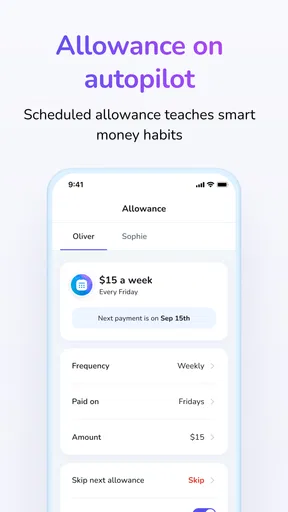
Teaching a child about money is easier when the lesson connects to choices they make every week, rather than a lecture about budgeting. That is the idea behind Till: Debit Card for Kids, a finance app from Till Financial that pairs a child-focused debit card with tools for parents and young spenders. I see its strongest use as a way to turn everyday spending into a conversation: what to buy now, what to save for, and how to decide between the two.
What you can expect to pay
The app is free to download, which makes it possible to explore the basic proposition without paying an upfront app price. Till also offers in-app purchases priced from $6.99 to $69.99 per item, so “free” should not be read as a promise that every option or service is cost-free. I would check the current purchase details before committing, especially if you are comparing the total cost with a bank account or another family money tool.
That distinction matters because a debit card for a child is not just another budgeting app. A parent may be weighing the convenience of a dedicated setup against options they already have, such as giving cash, using a standard youth account, or managing allowances informally. Till’s appeal is the combination of a card and a child-oriented app; whether that combination is worth paying for depends on how often your family will use its teaching and oversight tools.
Value comes from the conversations
The most useful outcome is not simply that a child can pay with a card. It is that parents can use a purchase, an allowance, or a savings target as a prompt to talk through priorities. A child who wants a snack after school and is also saving for something larger has a concrete decision to make. That is a more memorable lesson than hearing “save your money” without seeing the trade-off.
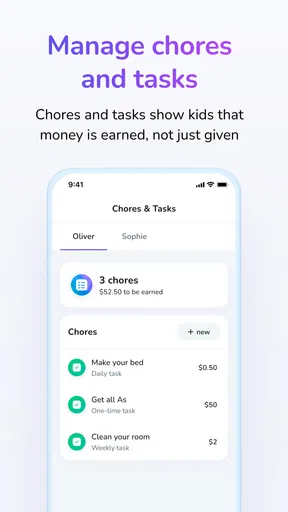
For families that already discuss chores and pocket money, assigning a value to tasks can make expectations more visible. It can also prevent a familiar disagreement: whether a particular job is part of ordinary family responsibility or something that earns extra money. I would decide those rules together before entering tasks, then revisit them if the arrangement starts to feel unfair or overly transactional.
Another practical use is separating money by purpose in conversation, even when a child sees one balance. Before a weekend outing, for example, you can agree what portion is available to spend and what should remain for a goal. That gives the child room to make a choice without making every small purchase a parental negotiation. The app works best as a support for that agreement, not as a substitute for it.
Where it differs from familiar alternatives
Cash remains a strong teaching tool for younger children because the money is tangible: a child can see a small amount shrink after buying something. A conventional bank account may be a better fit for families who mainly want a place to hold money or who already have a suitable youth banking arrangement. Till sits between those approaches, using a card and app to make spending and parent-child money routines more structured.
Worth Reading Before You Choose

EA SPORTS FC Mobile 26 Is a Bigger Football Game, but It Takes Time

Flipboard Shows What News Apps Must Do Beyond the Feed

Switching to Android Auto Means Rethinking Your Driving Routine

Google Calendar Makes a Crowded Week Easier to Manage

Ludo King Makes the Most of the Minutes Between Plans

Baby Panda World Brings Quick Play to Modern Phones, but Its Game Library Feels Busy
That middle ground is useful, but it is not automatically better. A card can make purchases feel abstract, especially to a child who is still learning that tapping to pay uses real money. I would pair early card use with brief check-ins: ask what the purchase cost, what remains, and whether the child is still happy with the choice. If your child is not ready to keep track of digital spending, cash or supervised purchases may be a better starting point.
Parents should also think about how much involvement they want. Notifications can make it easier to stay aware of activity, but constant alerts may turn into a stream of interruptions or make a child feel watched. I would agree on what parents will check and when, then use the information to discuss patterns rather than criticize every decision. That balance is central to making a money-learning tool feel supportive instead of punitive.
Using Till in a family routine
A realistic way to begin is with one recurring situation rather than trying to teach every money skill at once. If a child buys a snack after school, set a simple spending amount for that purpose and let them make the choice. Later, ask whether they would make the same decision again. The point is not to get every choice right; it is to help the child notice the link between spending now and having less available later.
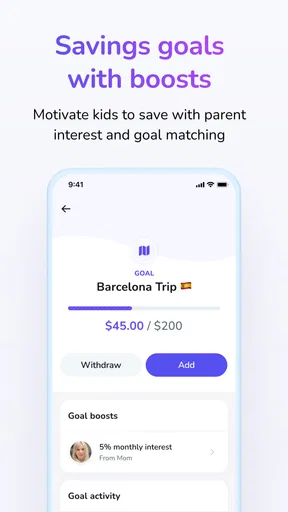
For a bigger goal, agree on what the child is saving toward and how progress will be reviewed. A parent can use the savings goal as a reason to discuss patience, changing priorities, or whether the target still matters. One useful tip is to let the child explain the plan in their own words before adding money tools: if they cannot say what they are saving for or what they can spend, the app alone will not make the decision clear.
Getting Started with Till
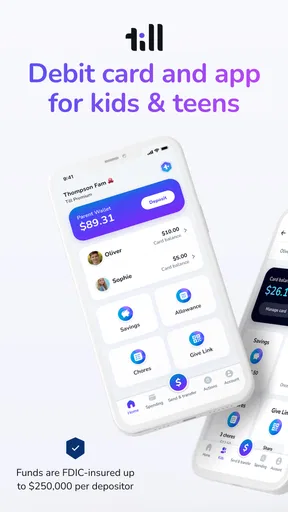
First off, setting up Till is a breeze. You download the app, create an account, and voilà, you’re on your way to financial wizardry. The app is designed for both Android and iOS, so no worries about compatibility issues. Once you're in, you can order a debit card for your kid, which is where the magic begins.
The app interface is super user-friendly. It’s colorful and engaging, which is perfect for kids. They’ve nailed the balance between aesthetics and functionality, making it appealing without being overwhelming. I mean, who wants a boring finance app, right?
Features that Shine
One of the standout features is the ability to set up chores and tasks for your kids. You can assign chores, attach a dollar amount, and even set deadlines. It’s like having your own little family economy. When the chores are done, the money goes straight into their account. This feature not only teaches kids the value of earning but also instills a sense of responsibility.
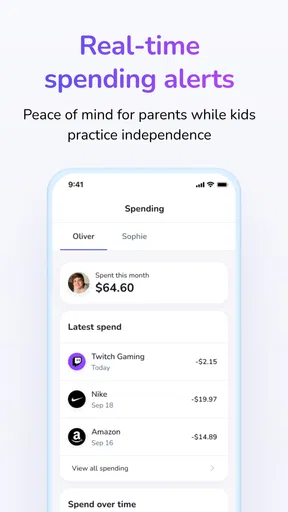
Another cool feature is the real-time notifications. I get a ping every time my kid makes a purchase, which is both reassuring and, let’s face it, slightly terrifying. But hey, it’s a great way to keep track of their spending habits without being a helicopter parent.
Let’s not forget the educational aspect. Till offers resources to teach kids about saving, budgeting, and making smart financial choices. It’s like having a mini financial advisor in your pocket. And the best part? It’s all done in a way that’s fun and engaging for the younger crowd.
Real-Life Application
So, how does all this translate into real life? Well, I gave my kid a budget for a month and let them loose with their Till card. It was fascinating to watch their decision-making process. They had to think twice before splurging on candy or that extra toy, knowing they had to save for something bigger. It was like watching a mini adult in action!
We also used the app to set savings goals. My kid decided to save for a new bike, and with the app's goal-setting feature, they could track their progress. Seeing the savings grow was a huge motivator, and it was a proud moment when they finally hit their target. High-fives all around!
Who will get the most from it
I think Till is best for parents who want their child to practice making modest spending decisions while a parent remains part of the process. It can suit families introducing an allowance, linking some tasks to earnings, or helping a child work toward a specific purchase. It is less compelling if you only need a place to store money, if you prefer cash-based lessons, or if you do not want to manage another app and card routine.
It is also worth matching the setup to the child’s maturity. A child who can remember a goal and talk through a purchase may benefit from more independence; a younger child may need a parent to review each step together. There is no need to hand over broad responsibility all at once. Starting with a narrow, familiar use—such as spending money for one outing—lets you see whether the card encourages thoughtful choices or simply makes spending easier.
Questions to settle before relying on it
Before making Till part of your family’s routine, I would check what the in-app purchases cover and whether the options you want require a purchase. The listed range is broad enough that the exact item matters more than the word “free.” I would also talk through who is responsible for setting expectations, how often you will review spending, and what happens when a child changes their mind about a savings goal.
Another useful question is whether the child can handle the card’s everyday freedom. A debit card is not the same as cash in hand: purchases can happen quickly, and a notification after a transaction does not teach the lesson by itself. Start with clear limits you can explain, then make room for small mistakes. If you want a hands-off banking product, or need a specific financial arrangement beyond a child-focused spending and learning tool, compare other options before choosing.
Why It’s Worth Trying
In a world where financial literacy is crucial, Till: Debit Card for Kids is a brilliant tool for parents. It’s not just about managing money; it’s about understanding its value. The app makes learning about finance fun and interactive, which is exactly what kids need. Plus, with the added security features, parents can relax knowing their kids’ spending is under control.
There is a practical limitation behind that enthusiasm: families have to keep the conversation going. Chore payments, purchase alerts, and savings targets can all support a lesson, but none automatically teaches a child to distinguish a need from a want. I would treat those tools as prompts, not proof that a child has mastered budgeting. Parents who prefer a simpler routine may find an ordinary allowance and occasional planning talk easier to maintain.
Wrapping it up, if you're a parent looking to teach your kids about money in a way that’s relevant and practical, Till is worth considering. It’s more than just a debit card; it’s a step towards financial independence for your kids. So, go ahead, give it a try, and watch your kids become little financial gurus. Who knew managing money could be this fun?
A few details for deciding
Till is a free finance app for everyone, developed by Till Financial. It has a 4.6 average from around 1.9 thousand ratings, with over 100 thousand installs. It was released on April 27, 2022, and version 162.28.6 requires Android 7.0 or later. Those details suggest an established app rather than a brand-new experiment, but they do not replace checking that the current app and purchase options fit your needs.
My verdict is a qualified yes for families who want a child’s debit card to be part of regular money conversations, especially around chores, spending choices, and saving toward a goal. I would skip it if the paid options do not suit your budget, if your child is not ready for digital spending, or if cash or an existing youth account already does the job. The value is not simply access to a card; it is whether your family will use the setup to help a young person make decisions with increasing confidence.
Pros
- User-friendly interface for children.
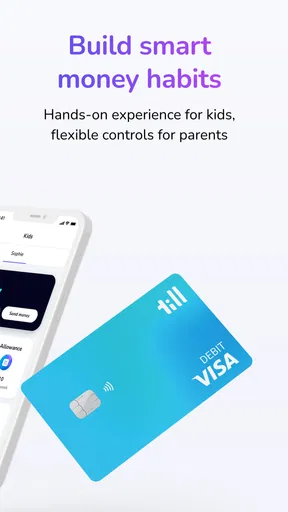
- Parental controls over spending.
- Real-time notifications for transactions.
- Customizable savings goals.
- Educational financial tools included.
Cons
- Limited international use options.
- No cash withdrawal capabilities.
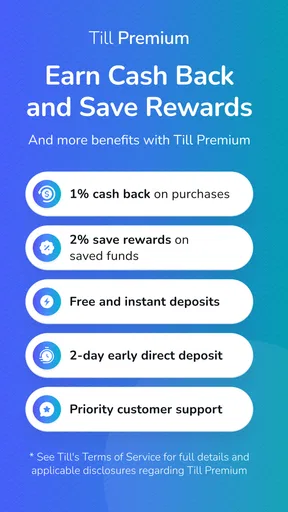
- Some features require a subscription.
- In-app ads can be distracting.
- Not suitable for very young kids.
FAQs for Till: Debit Card for Kids
What is Till: Debit Card for Kids?
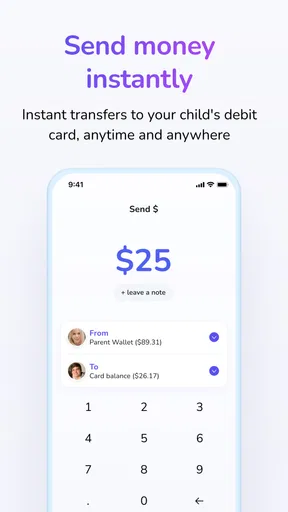
Till is a financial app designed to teach kids money management skills through a debit card system. Parents can oversee spending, allocate allowances, and set savings goals. The app provides a secure way for children to learn about budgeting and financial responsibility under parental guidance.
How does the parental control feature work?
Parents have full control over their child’s account through the Till app. They can set spending limits, approve transactions, and even block the card if necessary. This feature ensures that parents can monitor and guide their child's financial habits while providing a safe learning environment.
Is Till safe for my child to use?
Yes, Till is designed with security in mind. The app uses encryption to protect personal data and transactions. Parents have oversight of all transactions, and lost cards can be easily frozen from the app. It's a secure way for kids to learn financial responsibility.
What age is Till suitable for?
Till is suitable for children aged 8 and up. It is tailored to provide age-appropriate financial education and tools. Parents can customize the experience according to their child’s maturity level, ensuring a beneficial learning environment for different age groups.
Are there any fees associated with using Till?
Till may have fees related to card issuance or certain transactions. It’s important to review the app’s pricing details before signing up. The fees are typically transparent and designed to be minimal, making it accessible for families looking to educate their children about money management.


